Building a Mini Cloud on Azure — The Power of Minimalism & Linux
Vikram
Author
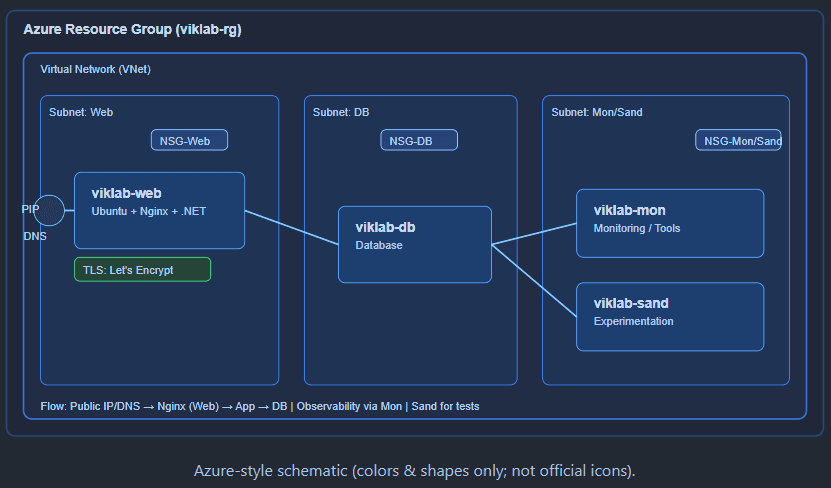
In a world obsessed with large-scale cloud deployments and enterprise budgets, here’s a contrarian truth: you don't need massive resources or expensive licenses to learn, ship, and run real workloads.
With a handful of lightweight Azure resources and Linux, you can build a personal mini cloud that mirrors enterprise patterns — at minimal cost.
What We Built
Provisioned with Terraform for repeatability and version control:
Resource Group:
viklab-web:
Nginx reverse proxy + app host (.NET runtime)
viklab-db:
database node
viklab-mon:
monitoring/utilities
viklab-sand:
experimentation box
viklab-rg
Virtual Network & Subnets:
isolated zones for Web, DB, and Mon/Sandbox
Linux Virtual Machines:
NSGs:
minimal, explicit ingress/egress
Public IP + DNS:
for the web entrypoint
HTTPS:
free TLS via Let's Encrypt / Certbot
Server Config & DB Sizing (Minimal Yet Practical)
Below is a clean baseline you can run comfortably on credits or a low bill. Tweak up/down as traffic grows.
Database Sizing (Dev/POC)
Initial DB size: 5–10 GB. Plan growth in 10–20 GB steps.
Place DB data + WAL/redo on a separate Premium SSD data disk for IOPS.
Backups: daily logical dump + weekly VM snapshot; retain 7–14 days for dev.
PostgreSQL: set shared buffers to about 25% of RAM; enable WAL compression; turn on auto-vacuum; pgbouncer if concurrent connections grow.
MySQL/MariaDB: InnoDB buffer pool 50–70% of RAM; enable slow query log; rotate binlogs.
If you outgrow the VM, move to Azure Database for PostgreSQL/MySQL Flexible Server (start with 1–2 vCores, 32–64 GB storage).
Server Specifications
viklab-web (Nginx reverse proxy + .NET app host)
Size:
B1s (1 vCPU / 1 GB RAM)
OS Disk:
32 GB Standard SSD
Notes:
Production-ready setup with Nginx, .NET Runtime, and Certbot auto-renew TLS.
Size:
B2s (2 vCPU / 4 GB RAM)
Disks:
64 GB Standard SSD (OS) / 128 GB Premium SSD (Data)
Notes:
DB + WAL on separate disk; daily logical dump & weekly snapshot.
Size:
B1s (1 vCPU / 1 GB RAM)
OS Disk:
32 GB Standard SSD
Notes:
Collects metrics/logs; lightweight Grafana dashboard; rotate logs.
Size:
B1s (1 vCPU / 1 GB RAM)
OS Disk:
32 GB SSD
Notes:
Used for learning and testing scripts/Terraform; deallocate when idle to save cost.
viklab-db (PostgreSQL database server)
viklab-mon (Monitoring/utility)
viklab-sand (Sandbox/test VM)
Proof of Concept
We'll drop this HTML file into our web VM's Nginx site and map DNS to it. Then you can visit our live page here: https://blog.viklab.online. That page is served by our own Nginx on Ubuntu in Azure, secured with Let's Encrypt. Simple. Real. Live.
What's on the Web VM
Ubuntu (minimal) + Nginx
.NET Runtime / SDK for APIs & apps
Certbot (Let's Encrypt) with auto-renew
Hygiene: SSH keys, firewall rules, fail2ban
Runs comfortably on B1s/B2s (1 vCPU, 1–2 GB RAM) — tiny bill, big learning.
Why This Matters
Cost:
sub-₹1k/month on pay-as-you-go; free if you leverage credits
Control:
own the stack — no black boxes
Real DevOps muscle:
IaC, SSL, security, deployments
Career edge:
practical cloud + Linux experience
Final Thoughts — Why Linux First
The real world runs on Linux. Hyperscalers and tech giants like Google, Amazon (AWS), Meta, Netflix, and Tesla rely heavily on Linux for efficiency, robustness, performance, and cost-effectiveness. Research and space organizations — from NASA to CERN — and virtually all Top500 supercomputers run Linux. Even Android, the world’s most popular mobile OS, sits on a Linux kernel.
Compared to Windows Server, millions more servers globally run Linux across data centers, edge devices, and containers. If you’re serious about building and shipping — learning Linux isn’t optional. It’s foundational.
What's Next
Containerize the web tier and add CI/CD (GitHub Actions)
Observability: metrics, logs, basic alerts
One-click Terraform module to launch the whole stack